Firebase Push Notification
Integrate Firebase to send Push Notification to all app users directly from the Appilix Control Panel.
Appilix is the ultimate solution for converting your website into a mobile app. Get started today and take your web presence to the next level!
Seamlessly convert your web presence into an Android or iOS mobile app in just 3 steps. No coding knowledge, build in minutes.
Enter your web address, give a name of your app and convert the website to app for Android or iOS device.
Personalize the app with custom logo, stunning splash screens and advanced features. Easy and hassle-free!
Appilix's website to mobile app conversion process builds your Android or iOS app in less than 5 minutes!
Explore Appilix's Website to App Builder with advanced tools to easily convert your website into a fully functional mobile app.

Integrate Firebase to send Push Notification to all app users directly from the Appilix Control Panel.

Integrate Admob to display ads and boost revenue, unlocking full monetization potential for your website to app solution.

Add a navigation drawer for easy access, enhancing your website to mobile app experience with a real app-like interface.

Display quick navigation menu on the bottom of the app to provide easy and seamless user experience.

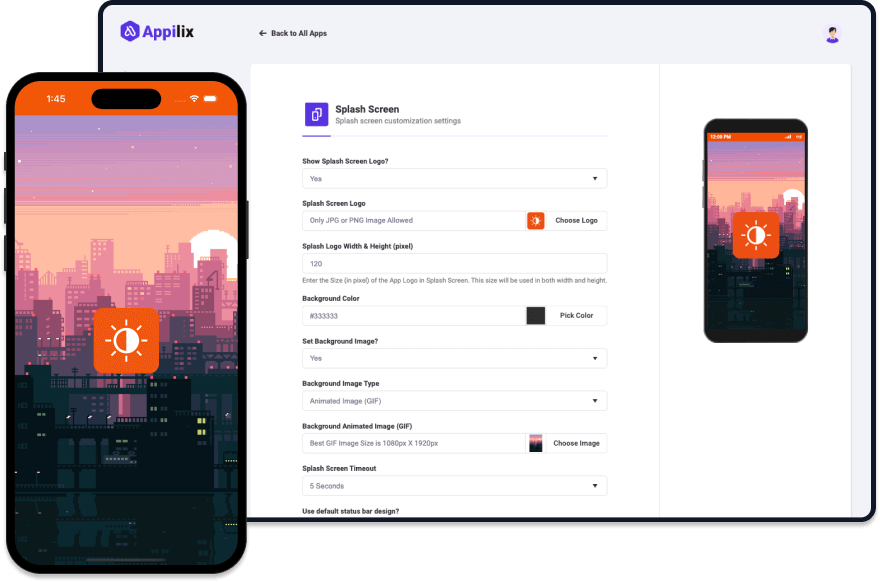
Set an initial screen with custom logo and background that appears when the application is launched.

Automatically open the app when your website is being browsed or the website URL being clicked on other apps.

Add custom CSS or Javascript codes to customize the website to app experience with extra features.

Enable Google sign-in for native authentication, making it easier for users to access your website in mobile app securely.

Enhance your security for the entire app or specific part of your app with biometric authentication system.
There are more exciting features and native modules of Appilix. Explore All Features
Experience the seamless transition from website to mobile app with Appilix, unlocking a world of benefits including enhanced user engagement.

Converting your website to a mobile app is now quick and easy with Appilix's web to app converter. Appilix ensures a seamless experience, providing a native look and feel for both Android and iOS apps, so users enjoy a smooth, intuitive interface.
With mobile users spending about 90% of their time in apps, according to eMarketer, converting your website to app offers a direct way to engage your audience. This leads to greater visibility and interaction with your products or services, expanding your reach and enhancing the overall user experience.
Ready to bring your website to life on Android and iOS? With Appilix, converting your website to an Android and iOS app is easier—no coding required! Start now and elevate your business on both mobile platforms.
Get Started NowCreate and customize your website into an app in 5 minutes! No coding required—access the builder from any device and personalize every detail.
Convert your website into a mobile app in just 5 minutes. Enjoy a hassle-free experience with our fast, browser-based web to mobile app builder.
Personalize every aspect of your web to app, including splash screens, navigation, and colors, all without writing a single line of code.
No need for Mac or Windows PC! Build and customize your website to app directly from your browser on any device, anytime.
Choose the plan that fits your needs—no hidden charges. Get all future updates, whether you’re converting your website to app or updating one!
Let's build your first app for free and explore for 30 days.
Get Started NowAll premium features and no need to worry about renewal.
Get Started NowBilled as $$69.00 per year including all the features and updates.
Get Started NowLet's build your first app for free and explore for 30 days.
Get Started NowAll premium features and no need to worry about renewal.
Get Started NowBilled as $79.00 per year including all the features and updates.
Get Started NowThe above prices do not include applicable taxes based on your billing address. The final price will be displayed on the checkout section, before the payment is completed.

At Appilix, we’re dedicated to continuous improvement, adding new features and enhancing customer support to ensure your success with every app build.
The CMA-9000 Flight Management System (FMS) by CMC Electronics is a versatile, civil-certified system utilized in professional Part Task Trainers (PTT), flight simulators, and research for optimizing flight profiles. Professional simulation focuses on high-fidelity training for pilot proficiency and systems integration, while research applications have shown significant fuel savings through trajectory optimization. For technical details on the system's capabilities, review the product documentation at CMC Electronics. CMA-9000 FMS/RMS - CMC Electronics
Mastering the Skies: The Comprehensive Guide to the CMA 9000 FMS Simulator
The CMA 9000 FMS Simulator (often referred to as a Part-Task Trainer or PTT) is a critical software-driven tool used by pilots and maintenance crews to master the CMC Electronics CMA-9000 Flight Management System. As modern cockpits transition toward highly integrated digital environments, this simulator provides a risk-free platform for learning complex flight planning, tactical navigation, and system management before ever stepping into an aircraft like the C-130 Hercules, Airbus A310, or Sukhoi Superjet 100. What is the CMA 9000 FMS?
To understand the simulator, one must first understand the hardware. The CMA-9000 Flight Management System (FMS) is a compact, high-performance unit that combines a traditional Flight Management Computer (FMC) and a Multifunction Control Display Unit (MCDU) into a single cockpit-mounted enclosure. Key functions of the actual unit include:
Multi-Sensor Navigation: Integrates data from GPS, INS, DME, and VOR to provide 4D navigation.
Radio Management: Acts as a centralized controller for communication and navigation radios.
Tactical Capabilities: Supports specialized missions such as Search and Rescue (SAR) patterns and tanker rendezvous. Core Features of the CMA 9000 FMS Simulator
The simulator, or Part-Task Trainer (PTT), is designed to replicate the logic and interface of the flight hardware with high fidelity. Pilots use it to build "muscle memory" for the alphanumeric keyboard and sunlight-readable color display. 1. Realistic Flight Planning & Guidance
The simulator allows users to practice extensive flight planning without burning fuel. This includes: CMA-9000 FMS/RMS - CMC Electronics cma 9000 fms simulator
The CMA 9000 FMS Simulator: A Comprehensive Training Solution for Pilots
The aviation industry has witnessed significant advancements in technology over the years, with a focus on improving safety, efficiency, and pilot training. One such innovation is the CMA 9000 FMS (Flight Management System) simulator, a cutting-edge training tool designed to equip pilots with the skills and knowledge required to operate complex aircraft systems. In this article, we will explore the features, benefits, and applications of the CMA 9000 FMS simulator, as well as its role in shaping the future of pilot training.
What is the CMA 9000 FMS Simulator?
The CMA 9000 FMS simulator is a sophisticated training device that replicates the functionality of a real Flight Management System (FMS) found in modern aircraft. The FMS is a critical component of an aircraft's avionics system, responsible for managing navigation, flight planning, and performance data. The CMA 9000 simulator is designed to mimic the behavior of a real FMS, allowing pilots to practice and hone their skills in a realistic and immersive environment.
Key Features of the CMA 9000 FMS Simulator
The CMA 9000 FMS simulator boasts a range of features that make it an effective training tool for pilots. Some of its key features include:
Benefits of the CMA 9000 FMS Simulator
The CMA 9000 FMS simulator offers a range of benefits for pilots, airlines, and training organizations. Some of its key benefits include: The CMA-9000 Flight Management System (FMS) by CMC
Applications of the CMA 9000 FMS Simulator
The CMA 9000 FMS simulator has a range of applications across the aviation industry, including:
The Future of Pilot Training: Trends and Insights
The CMA 9000 FMS simulator is part of a broader trend towards simulation-based training in the aviation industry. As technology continues to evolve, we can expect to see even more advanced and sophisticated training tools emerge. Some trends and insights shaping the future of pilot training include:
Conclusion
The CMA 9000 FMS simulator is a powerful training tool that is helping to shape the future of pilot training. Its realistic FMS simulation, customizable scenarios, and interactive interface make it an effective way for pilots to develop and maintain their FMS skills. As the aviation industry continues to evolve, we can expect to see even more advanced and sophisticated training tools emerge. With its focus on simulation-based training, competency-based training, and standardization, the CMA 9000 FMS simulator is well-positioned to play a key role in the future of pilot training.
Content for a CMA-9000 Flight Management System (FMS) simulator focuses on its role in reducing pilot workload and providing a high-fidelity environment for mastering complex, mission-critical operations. Designed for both fixed-wing and rotary platforms, the CMA-9000 integrates navigation, radio management, and specialized tactical functions into a single interface, making it a standard for both civil and military pilot training. Core Training Objectives
A simulator for the CMA-9000 aims to build proficiency in several key areas: Benefits of the CMA 9000 FMS Simulator The
System Mastery: Familiarization with the Control Display Unit (CDU) interface, including line select keys, the scratchpad, and annunciators.
Flight Planning: Practice creating, editing, and activating complex flight plans with up to three different route options.
Tactical Operations: Training in specialized missions such as Search and Rescue (SAR) patterns, transition to hover, and tactical (pilot-defined) approaches.
Vertical Navigation (VNAV): Mastering full 4D navigation, including vertical guidance for en-route, terminal, and non-precision approach phases. Key Technical Features to Simulate
To provide "solid" content, a simulator must replicate the following specific CMA-9000 functionalities: CMA-9000 FMS/RMS - CMC Electronics
The CMA-9000 utilizes a specific syntax for entering coordinates, fixes, and airway intersections. A misplaced decimal point or a typo in a waypoint name can route an aircraft miles off course. The simulator allows pilots to make these mistakes safely, learn from error messages (such as "NOT IN DATABASE"), and develop the muscle memory required for fast, accurate typing.
The simulator should compute predicted fuel burn, time en route, and wind corrections. This turns the device into a flight planning tool as well as a procedural trainer. Users can experiment with different cruise altitudes and cost indexes to see real-time changes in fuel predictions.