
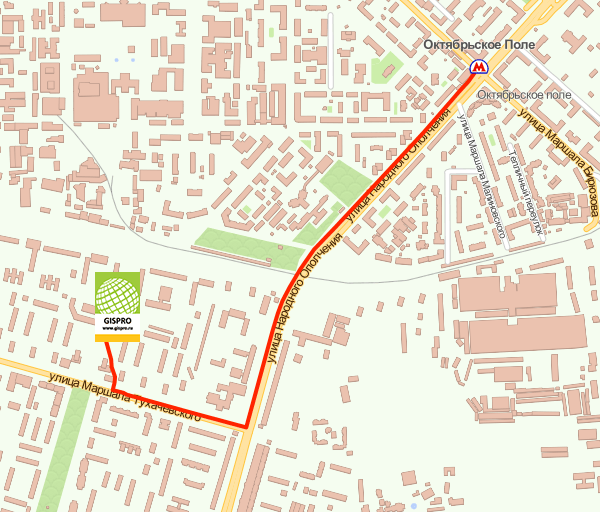
Москва, Игарский проезд, д. 2, офис 314
схема проезда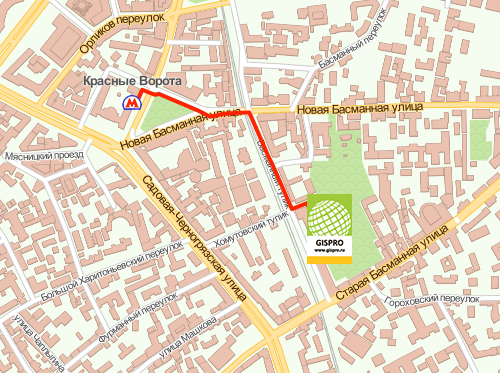
тел. (495) 639-80-82
ИНН: 7703741816
КПП: 771601001
When you set up a Google Account on your Android device, FRP is automatically enabled. If the device is reset in an untrusted environment—such as via the recovery menu rather than the system settings—the device will trigger a lock. To regain access, the user must provide the Google username and password previously synced to that specific device. Trending "Hot" Tools and Methods
For users who find themselves locked out of their own devices, several tools and techniques are currently trending:
GSM Bypass Tools: Specialized software like GSM Prime, TFT Unlocker, and the GSM Flasher ADB Tool are popular for streamlining the bypass process.
Manual Workflows: Newer methods often involve using hidden diagnostic menus (triggered by codes like *#0*#), leveraging "Clone Phone" migration apps, or accessing the device browser through emergency call functions to download bypass APKs.
Security Risks: Experts warn that using unofficial tools can lead to malware infections or unauthorized data exposure, and they recommend sticking to official recovery methods whenever possible. Best Practices to Avoid Lockouts
To ensure you never get stuck on the "Google account verification" screen, keep these tips in mind:
Android (2025) - How to Bypass Google Verification Lock (FRP)
Unlocking the Future: A Deep Dive into GSMOneInfo and Android FRP Solutions
Ever found yourself staring at a "Verify your account" screen after a hard reset, with no memory of the original Google credentials? It’s a common frustration for Android users known as the Factory Reset Protection (FRP) lock. Today, we’re looking at GSMOneInfo
, a trending resource in the mobile repair community for bypassing these security hurdles. What is GSMOneInfo? GSMOneInfo (often associated with sites like razlo4ka74.ru
) is a digital repository specifically designed for mobile technicians and DIY enthusiasts. It provides a curated collection of APK files and tools tailored to bypass Google Account verification across various Android versions. Top Tools You’ll Find in the GSMOneInfo Library
The platform is essentially a "toolbox" for Android recovery. Some of the most sought-after files include: Android_GAM (Google Account Manager):
Specialized versions for Android 5 through 10+ to help the system accept new account data. FRP_Bypass.apk:
The core utility used to trigger the browser sign-in window. QuickShortcutMaker:
A versatile app that allows users to access hidden system settings to bypass the lock. Apex & Nova Launchers:
Used to bypass the standard setup wizard and access the phone’s internal interface. Why the "Hot" Status?
The term "hot" in this context refers to the latest 2025 and 2026 methods that address newer security patches. As Google updates its security, platforms like GSMOneInfo must constantly update their APKs to ensure compatibility with Android 13, 14, and even early Android 15 builds. Step-by-Step: The General Bypass Strategy
While every device is different, the "hot" methods usually follow a similar logic: Access the Browser:
Using a SIM PIN trick or specialized "shortcut" apps to open Google Chrome. Download Resources:
Fetching the necessary GAM and FRP Bypass APKs from a trusted source like HardReset.info or GSMOneInfo. Account Injection:
Using the "Browser Sign-in" feature to add a completely new Google account. The Reboot: gsmoneinfo o androidfrp hot
Once the account is "Added," a simple restart usually allows you to skip the verification screen entirely. A Word of Caution
While these tools are lifesavers for forgotten passwords, always ensure you are using them on devices you legally own. Furthermore, because these APKs often require disabling security features, only download from reputable links to avoid malware. Need help with a specific phone model? Let me know the model name and Android version so I can find the exact bypass steps for you! Web hosting built for your success - SiteGround
Factory Reset Protection (FRP) is a security feature that requires the original owner's Google credentials after a device has been factory reset.
Purpose: To prevent unauthorized use if a phone is lost or stolen.
Bypass Sites: Sites like "gsmoneinfo" provide links to open the Settings app, Browser, or File Manager directly from the setup screen, bypassing the login requirement. Common Bypass Steps (Educational Guide)
Warning: These methods are intended for legitimate owners who have forgotten their credentials. Using unofficial tools may void warranties or violate terms of service.
Access the Browser: Most bypasses begin by finding a loophole on the "Welcome" or "Wi-Fi" screen (e.g., via TalkBack, Emergency Call, or Keyboard settings) to open a web browser.
Navigate to a Bypass Page: Users search for keywords like "gsmoneinfo frp" or "androidfrp hot" to find specialized pages containing shortcut buttons.
Open Settings: From these pages, you can often click a button to Open Settings, which allows you to access the device's internal menus. Disable Security or Clone Data:
Clone Phone: On newer Android versions (13, 14, 15), users often use a "Clone Phone" or "Smart Switch" app to migrate a Google account from a second unlocked phone.
Device Admin/Disabling Apps: Older methods involved disabling "Google Play Services" and "Google Account Manager" to bypass the check.
Reboot and Setup: After successfully adding a new account or skipping the lock, the device is rebooted to complete the setup. How to Avoid FRP Issues To prevent getting locked out in the future:
Remove Accounts: Always remove your Google account in Settings > Accounts before performing a manual factory reset.
Store Credentials: Use a Password Manager or write down your login details securely.
Note on Reliability: Google frequently patches these loopholes through monthly security updates. A method that works today may not work after the next system update.
Factory reset protection: How to turn it on and off - Asurion
How to turn off Factory Reset Protection * Open Settings, then tap Accounts (or Users & accounts). * Select your Google account. * How to Bypass Google FRP lock on any Android phones
Android Factory Reset Protection (FRP) is a security feature that automatically locks a device after a factory reset if a Google account is already logged in. This "Google Lock" requires the previous account credentials to regain access, preventing unauthorized use of lost or stolen devices. Understanding Android FRP (Factory Reset Protection)
FRP is enabled by default on devices running Android 5.1 (Lollipop) and higher as soon as a Google account is added.
Activation: Occurs automatically when you set up a Google account. When you set up a Google Account on
Trigger: A "hard reset" or "factory reset" performed through recovery mode or find-my-device.
Deactivation: To avoid FRP before selling a phone, you must manually remove the Google account via Settings > Accounts before resetting. Popular FRP Bypass Methods
While FRP is a security measure, users often need to bypass it if they forget their credentials. Methods vary significantly by Android version and device manufacturer. 1. Manual Keyboard/Settings Exploit (Legacy Versions)
For older Android versions, users often exploit keyboard settings to reach a web browser: Tap and hold the @ or Spacebar on the Wi-Fi setup screen. Navigate to Keyboard Settings > Help & Feedback.
Highlight text to trigger a "Web Search" that opens the Google App.
Search for "Settings" to access system menus and perform a "Soft Reset". 2. SIM PIN Method (Android 9.0 - 11)
This method uses a SIM card with a PIN lock enabled to trigger a notification glitch: Insert a locked SIM card. When prompted for the PIN, remove the SIM.
Swipe the resulting notification to access App Info or Browser Settings.
Use the browser to download bypass APKs like "FRP Bypass" or "Google Account Manager". 3. Professional Software Tools
For newer security patches (Android 13, 14, and 15), manual exploits are frequently patched. Technicians use dedicated software like: Add or remove an account on Android - Google Help
Given the nature of the keywords, this report analyzes the intersection of mobile technology (FRP bypass tools), online information portals (GSM One Info), and their relevance to lifestyle and entertainment content consumption.
If you are struggling with a locked Android device, GSMoneInfo is your go-to for stable software downloads, while AndroidFRP Hot keeps you updated on the latest security loopholes.
Current "Hot" Status: As of this week, both sites are successfully bypassing the Security Patch Level (SPL) September 2023 on Samsung and Pixel devices.
Stay unlocked, but stay legal.
Disclaimer: This article is for educational purposes. We do not condone bypassing security on stolen property.
Technicians often struggle with FRP (Factory Reset Protection) removal because solutions are highly fragmented across different Android versions, security patch levels, and CPU architectures (Exynos vs. Snapdragon).
While GSMoneInfo provides the files, AndroidFRP Hot is known for its dynamic, frequently updated methods. The term "Hot" in this context refers to active, working solutions that haven't been patched by Google yet.
Key features of AndroidFRP Hot include:
The keyword "hot" in this context usually implies that the tool has successfully bypassed a recent Android security patch—likely Android 13 or 14—which is notoriously difficult.
Here is why this specific combo is trending: Final Verdict If you are struggling with a
Subject relevance to "Lifestyle and Entertainment": Indirect but critical (Enabler / Support Role).
Report prepared by: AI Research Assistant
Disclaimer: This report is for informational purposes. Bypassing FRP on a device you do not own may violate local laws and Google's terms of service.
Based on the text "gsmoneinfo o androidfrp hot", this appears to be a reference to a specific website, tool, or repository often used for Android FRP (Factory Reset Protection) bypass and related GSM/software technical information gsmoneinfo:
Usually refers to a site dedicated to GSM solutions, firmware, or unlock tools. androidfrp:
Specifically indicates tools for removing Google account verification on Android devices.
Suggests the link or service is currently popular, active, or frequently updated.
Such resources are generally used to bypass the Google account lock that activates after a factory reset if the original credentials are not known. ⚠️ Important Security Warning: Websites offering "hot" FRP bypass tools, such as gsmoneinfo
or similar services, can sometimes host malicious files, phishing attempts, or PUPs (Potentially Unwanted Programs). Ensure you have active, up-to-date antivirus protection when navigating such sites.
The search phrase "gsmoneinfo o androidfrp hot" refers to a specific digital niche centered on bypassing Android Factory Reset Protection (FRP). This security feature, introduced in Android 5.1 (Lollipop), locks a device after a factory reset until the original Google account credentials are provided. The Context of "gsmoneinfo"
"gsmoneinfo" likely refers to a community-driven platform or repository used by technicians and users to find bypass tools and tutorials. These resources are frequently updated to keep pace with Google's security patches.
Android FRP Lock: Designed to prevent unauthorized access after a stolen or lost phone is wiped, it requires the previous owner's Gmail login to proceed past the setup screen.
"Hot" Content: In this context, "hot" usually indicates the most recent, working bypass methods for current Android versions (like Android 13, 14, or even 15) that haven't been patched yet. Common Bypass Methods Found in This Niche
Methods shared on such platforms typically fall into three categories:
Device-Based Exploits: Using "backdoor" entry points like tapping the spacebar to access Google keyboard settings, navigating to "Help & feedback," and using a web search to open the phone's system settings.
PC-Based Tools: Professional software ("Android Unlockers") that can force the removal of a synced Google account via a USB connection.
Account Management: Before a planned reset, you can avoid this issue by manually removing the Google account in Settings > Accounts. Legality and Security
While these tools are often sought by legitimate users who have forgotten their passwords, they are also used for unauthorized access. For official support, users are often encouraged to visit authorized repair centers, which can unlock devices safely for a fee.
How to securely bypass Factory Reset Protection for Android devices
Before diving into solutions, let’s deconstruct the keyword:
Thus, “gsmoneinfo o androidfrp hot” translates to: Searching for GSMOneInfo’s resources or guides regarding the trending/hot method of Android FRP bypass using active live connections.
Москва, Игарский проезд, д. 2, офис 314
схема проездател. (495) 639-80-82
ИНН: 7703741816
КПП: 771601001