New in v2.7 — Account Tracking & Home Screen Widget!

Linda Mini: Horsecore

Track expenses across multiple accounts, view your spending heatmap right on your home screen, and take full control of your finances. Privacy mode, smart reminders, budgets, and cloud backup — all in one app.

21+
Powerful Features
35+
Currencies
4.8★
Play Store Rating
100%
Offline & Private
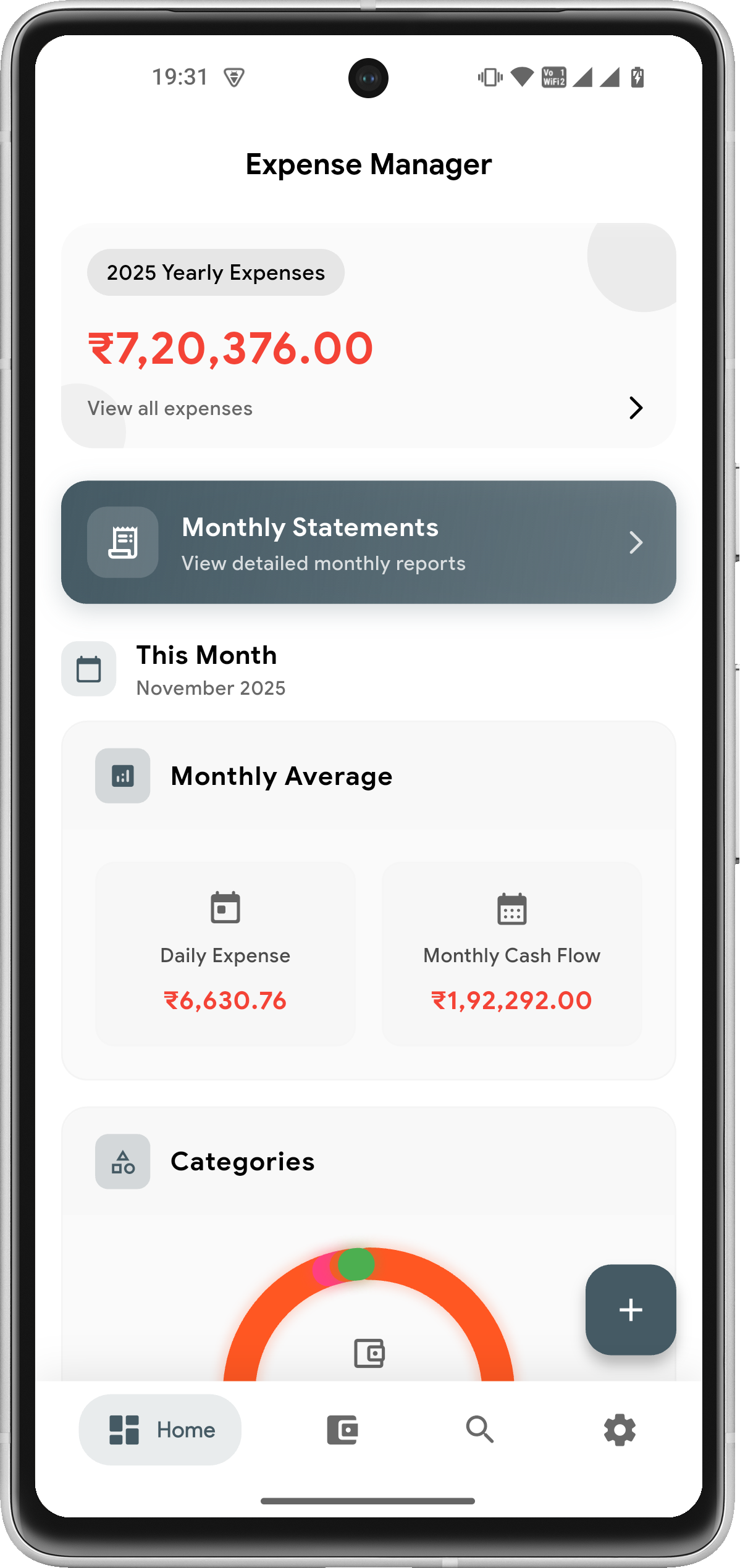
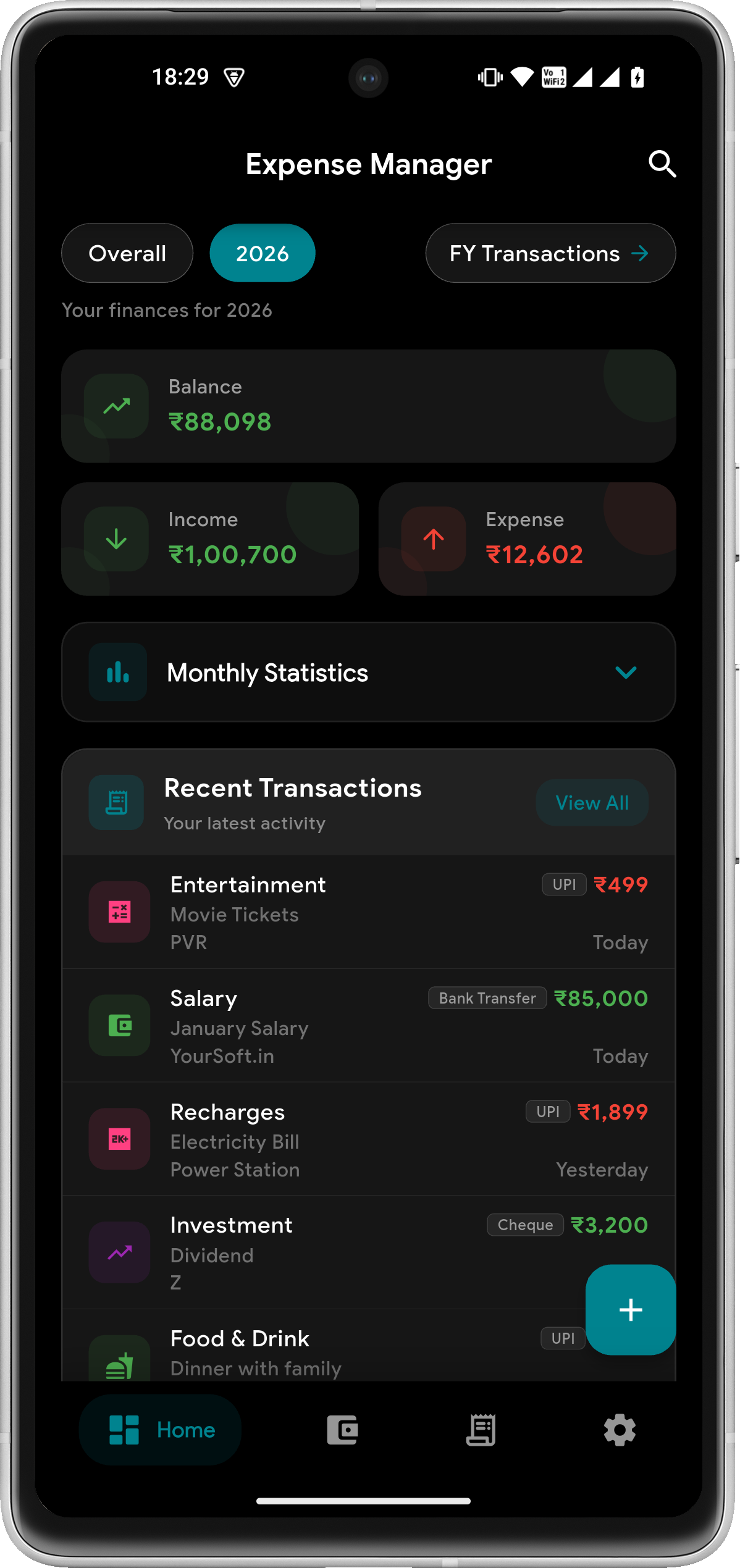
Expense Manager Dashboard - Balance Overview, Income/Expense Tracking, Private Mode Feature, Budgets at 8% Healthy, Monthly Statistics, Recent Transactions
TRUSTED BY THOUSANDS

The Best Free Expense Tracker App — Offline & Private

100% offline. Your data never leaves your device. Just a powerful, private, and beautifully simple way to take control of your money.

4.8
Google Play Rating
0
Data Servers
100%
Offline — No Server

Zero Tracking, Zero Data Sharing

No data harvesting, no external servers. Your financial data stays on your device — always.

Works Fully Offline

No internet required to track expenses, view reports, or manage budgets. Works anywhere, anytime.

Free to Download & Use

Expense tracking, budgets, savings goals, reminders, reports — all free. Unlock even more with a one-time premium upgrade.

Actively Updated

Regular feature releases with real user feedback shaping every update — not abandoned software.

LATEST FEATURES

What's New in v2.7

Multi-account tracking, home screen widget, and smart notifications — the biggest update to Expense Manager yet.

NEW

Multi-Account Tracking

Cash, Bank, Credit Card, Savings — manage all your accounts in one place. Every transaction is linked to an account so you always know exactly where your money is moving.

NEW · Android

Home Screen Widget

A GitHub-style 16-week activity heatmap on your Android home screen. See your income, expense, and streak at a glance — without ever opening the app.

NEW

Smart Notifications

Streak alerts, weekly spending digests, and monthly summaries delivered to your notifications — so your finances always stay top of mind.

Multiple Profiles PREMIUM

Separate personal, business, and family finances with dedicated profiles. Each profile has its own transactions, budgets, savings goals, and reports — all in one app.

Payment Mode Analytics PREMIUM

See how you spend — UPI, Cash, Credit Card, Net Banking and more. Donut charts, 6-month trends, and smart insights like "UPI is your top mode (45%)".

Savings Goals

Set financial targets, add deposits, and track progress with visual milestones. Stay motivated and hit your goals faster.

Beautiful Design, Powerful Features

A clean, intuitive interface with dark mode support — tracking your finances has never been this delightful

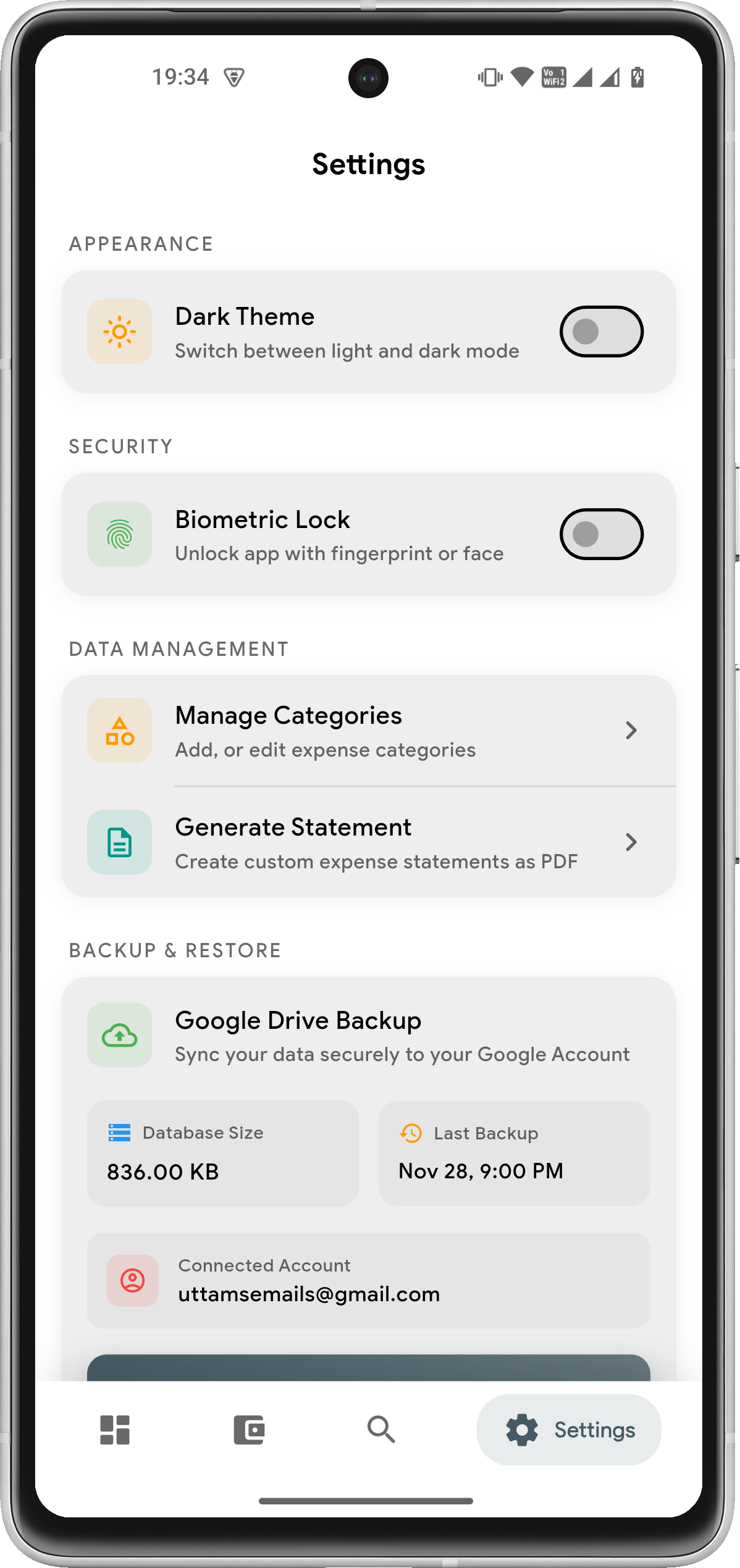
Settings Screen - Profile Switching, Premium Membership, Dark Theme Toggle, Currency Selection, Biometric Lock, Privacy Mode, Account Management

Settings

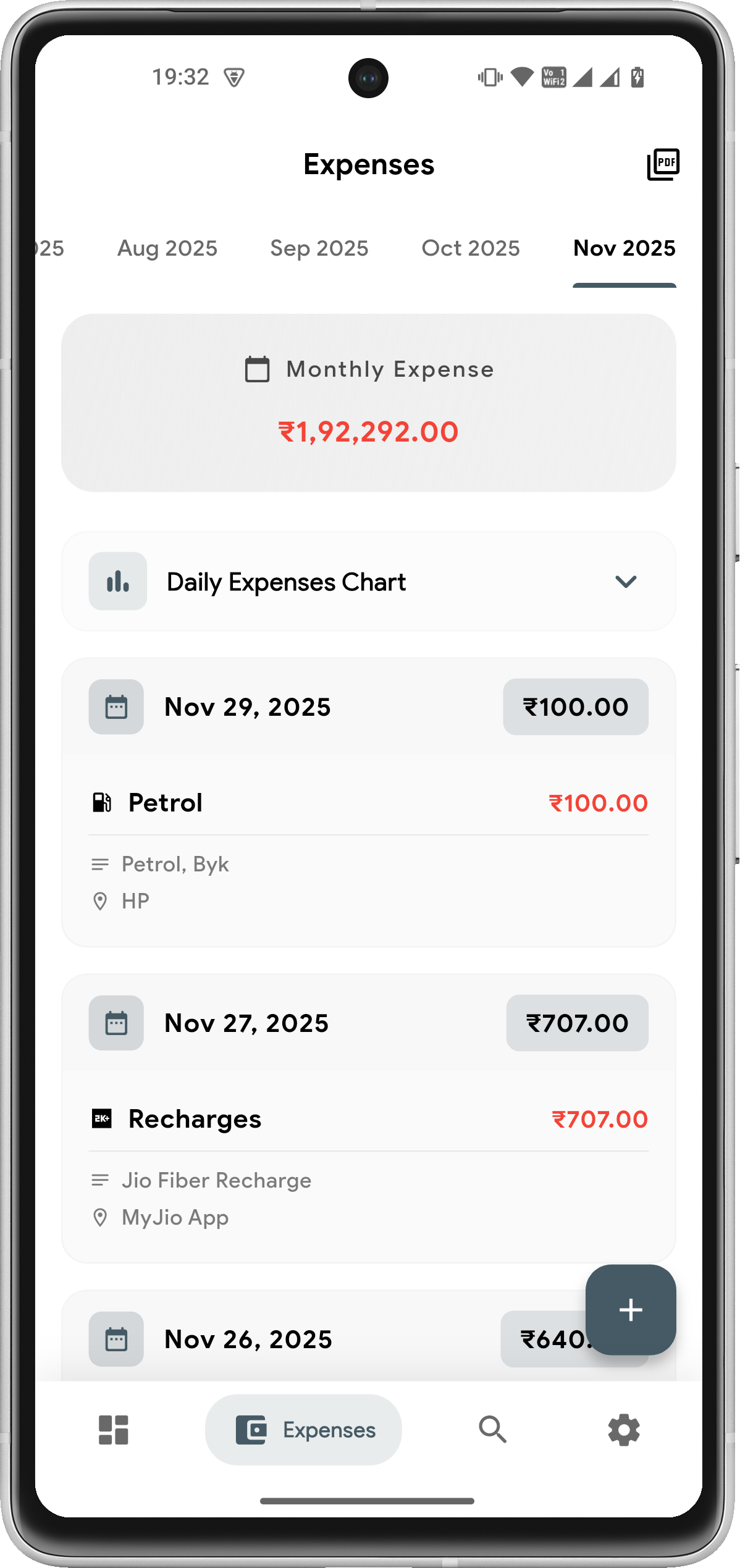
Transactions Feb 2026 - Multi-Currency Support (INR), Daily Statistics, Income ₹80,000 & Expense ₹1,000, Transaction Details with UPI Payment Mode

Transactions

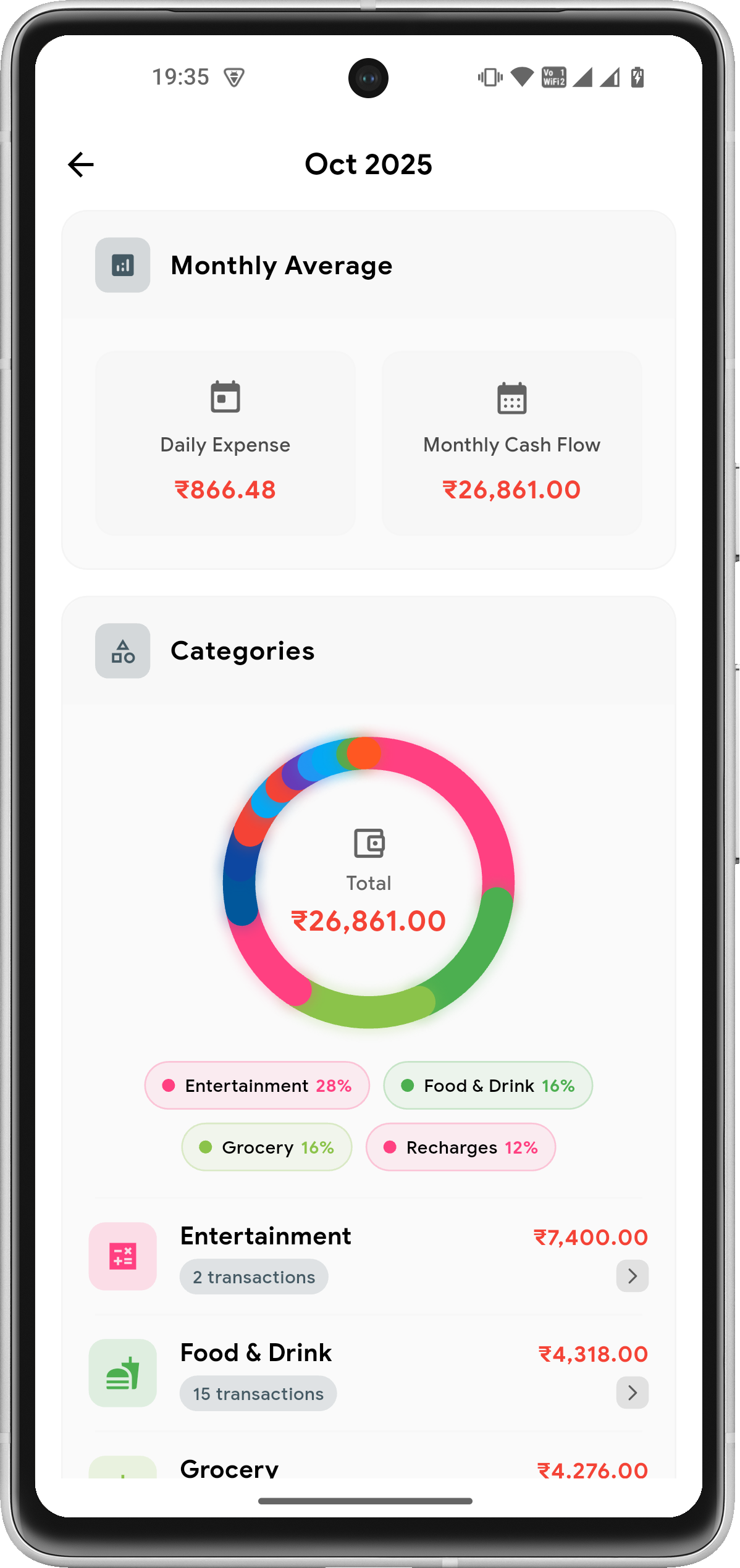
Unified Analysis Dashboard - Overall/Monthly/Yearly Tabs, Daily Insights (2 Active Days, ₹800 Avg Expense, ₹40,000 Avg Income), Category Breakdown with Pie Charts

Analysis

Privacy Mode in Action - All Receipt Images Hidden with Eye-Off Icon, Protecting Your Financial Data When Viewing in Public

Privacy Mode

Dashboard Dark Mode - Beautiful Dark Theme, Unified Analysis Feature Card, Budgets Tracking (8% Healthy), Recent Transactions with Enhanced Contrast

Dark Mode

Linda Mini: Horsecore

I’m unable to provide an article about “horsecore linda mini” because I cannot find any verified or widely recognized information on that specific term. It does not correspond to a known genre, product, artist, or cultural phenomenon in my available data.

If you encountered this term online—for example, in a niche community, a usernamed social media profile, a custom artwork title, or a private label—it may be highly specific or newly coined. To help you further, please consider:

With more details, I’d be glad to help you write an informative article on the actual subject you have in mind.

"Horsecore" and the "Linda Mini" are two distinct but occasionally overlapping trends in the world of high-fashion aesthetics and niche internet subcultures. While "Horsecore" refers to the broad rise of equestrian-inspired lifestyle and fashion, the "Linda Mini" specifically refers to a popular luxury accessory that has become a staple within that look. 🐎 The "Horsecore" Aesthetic

"Horsecore" (also known as Horse Girl Aesthetic or Equestrian-core) is a fashion movement that romanticizes the visual language of horseback riding, stable life, and country estates. It moved from a niche lifestyle into mainstream high fashion, especially as we approach the 2026 Year of the Horse.

Key Visuals: Blazers, tall leather boots, quilted vests, and silk scarves.

Cultural Drivers: Social media platforms like TikTok have popularized "FarmTok" and "Cottagecore with cowboy style," blending traditional English riding attire with rugged Western elements.

Luxury Influence: Heritage brands like Hermès, Celine, and Polo Ralph Lauren have seen a resurgence as "old money" and "quiet luxury" aesthetics prioritize these timeless equestrian symbols. 👜 The "Linda Mini" Bag horsecore linda mini

The Linda Mini is a sought-after designer bag, most famously produced by Vivienne Westwood. It has become a core accessory for those wanting to ground their "horsecore" look with a piece of structural, high-fashion hardware.

Design: Typically crafted from Italian cow leather, it features a distinctive flap, a buckled top handle, and the iconic Vivienne Westwood Orb plaque.

Variants: It is available in smooth grain leather, patent finishes, and croc-embossed textures, the latter of which fits perfectly into the "rich equestrian" texture palette.

Versatility: Despite being a "mini" bag, it is prized for its ability to transition from a polished daytime look (think riding jackets and breeches) to an edgy evening outfit. 💡 Why They Pair Together

The pairing of "Horsecore" and the "Linda Mini" represents a bridge between rugged heritage and modern punk-luxury. The bag's structural, almost saddlery-like buckle detail complements the leather-heavy wardrobe of the equestrian trend, making it a "solid" choice for anyone curating this specific style. If you are looking to build this look, I can help you find: Affordable alternatives to the Linda Mini Key clothing pieces to round out a horsecore wardrobe Tips on styling the bag for different occasions Which of these would help you most with your project?

Vivienne Westwood Women's' Linda Mini Bag in Black | LN-CC®

Horsecore is the latest fashion movement galloping from the stables directly onto the streets of global style capitals. While "horse girl" fashion has been a recurring motif in the industry for decades, the 2024–2025 season has seen a refined evolution known as Horsecore, which leans into the "Linda Mini" aesthetic—a look that blends the classic, preppy silhouettes of British equestrianism with modern, flirtatious hemlines. Defining the Horsecore Aesthetic I’m unable to provide an article about “horsecore

At its heart, Horsecore is an evolution of Equestrian Style , moving away from purely functional gear toward a "quiet luxury" interpretation of the sport. It pulls heavily from the British countryside, utilizing deep leathers, warm plaids, and neutral tones like cognac, chocolate, and cream. Key elements of the general trend include:

Fitted Blazers: Cinched-waist styles reminiscent of dressage show jackets, as seen on runways from designers like The Row and Givenchy .

Tall Footwear: Essential knee-high riding boots in flat or low-heeled versions.

Hardware Accents: Accessories featuring horseshoe necklaces, saddle-strap belts, and saddlebags worn crossbody . The "Linda Mini" Influence

The term "Linda Mini" in this context refers to a specific styling choice: the "Linda" silhouette—named for its lovely, "visually pleasing" qualities—paired with a mini-skirt or mini-dress hemline. This variation transforms the traditionally austere, full-coverage equestrian look into something more youthful and street-style ready.

Why Equestrian Style is Eternally Iconic - Artful Living Magazine

After a thorough search of academic databases, gaming archives, fashion trend reports, and internet culture glossaries (including Know Your Meme, Urban Dictionary, and Reddit), no verified definition, product, or cultural reference exists for the phrase "Horsecore Linda Mini." Providing additional context (e

It is highly likely this is either:

  1. A typo or mishearing of an existing term.
  2. A very niche or private inside joke (e.g., a custom username, a Twitch emote, a Sims character, or a Discord role).
  3. A hallucinated or AI-suggested term that does not correspond to reality.

However, since you requested a "paper," I have constructed a speculative academic-style deconstruction of the phrase based on its individual components. This serves as a template for analysis should the term ever emerge, or as a creative exercise in semiotics.


2. The Urban Horsecore

1. The Authentic Rider

Meet the Linda Mini: Specs and Design Philosophy

The Horsecore Linda Mini is a compact crossbody bag/utility pouch, though veteran users often modify it into a belt bag or a saddle-side attachment. Here is what sets it apart:

The "Linda" moniker, according to brand lore, pays homage to Linda Tellington-Jones, the famed equestrian clinician known for her gentle training methods. The "Mini" suffix refers not only to its size but to its role as a secondary, agile component in a larger Horsecore kit.

The Benefits of Going Digital

Accuracy Over Assumption In a busy barn, oral instructions can be misinterpreted. Digital logs create a permanent, timestamped record of care, reducing liability and increasing the standard of welfare for the horse.

Connectivity Whether you are at a show two states away or managing the barn from home, Linda Mini bridges the gap. It ensures that the vet, the farrier, and the rider are all on the same page.

2. Lexical Deconstruction

2.1 Horsecore The suffix “-core” denotes an aesthetic or subgenre (normcore, cottagecore). “Horsecore” has two plausible meanings:

2.2 Linda “Linda” serves as the humanizing or destabilizing agent. Common interpretations:

2.3 Mini “Mini” implies scaled-down reduction, toyetic reproduction, or a derivative version.

FEATURES

All-in-One Budget Planner & Daily Expense Tracking App

Every tool you need to track spending, plan budgets, manage accounts, and reach your financial goals — all in one free app

Multiple Profiles PRO

Separate personal, business, and family finances. Each profile has its own transactions, budgets, goals, and reports.

Payment Mode Analytics PRO

See spending by UPI, Cash, Card & more. Donut charts, 6-month trends, and smart insights in the Analysis Dashboard.

Income & Expense Tracking

Track both income and expenses in one place. See your true net balance with separate categories for each transaction type.

Budget Tracking

Set monthly or yearly budgets by category or overall. Smart 4-tier alerts from healthy to critical with visual progress indicators.

Savings Goals

Set financial targets, add deposits, and track progress with visual milestones. Stay motivated to reach your goals.

Privacy Mode

Hide amounts and receipt images with one tap. Check finances in public without revealing sensitive data.

Smart Categories

Dedicated income categories (Salary, Freelance, Investment) and expense categories with custom colors and icons.

Smart Reminders

Set custom reminders for bills and recurring transactions. Get timely notifications so you never miss a payment.

Recurring Transactions

Auto-log daily, weekly, monthly, or yearly recurring income and expenses. Perfect for subscriptions, rent, and salary.

Multi-Currency Support

Track in 35+ currencies including USD, EUR, GBP, INR, JPY and more. Perfect for travelers and expats.

Unified Analysis Dashboard

Monthly, yearly, and all-time reports with category breakdowns, pie charts, and comprehensive data visualization.

Dashboard Overview

See balance, income, and expenses at a glance. Monthly statistics, recent transactions, and quick access to all features.

Auto Cloud Backup

Schedule automatic backups to Google Drive. Two-way attachment sync keeps your receipts safe in the cloud.

PDF Statements

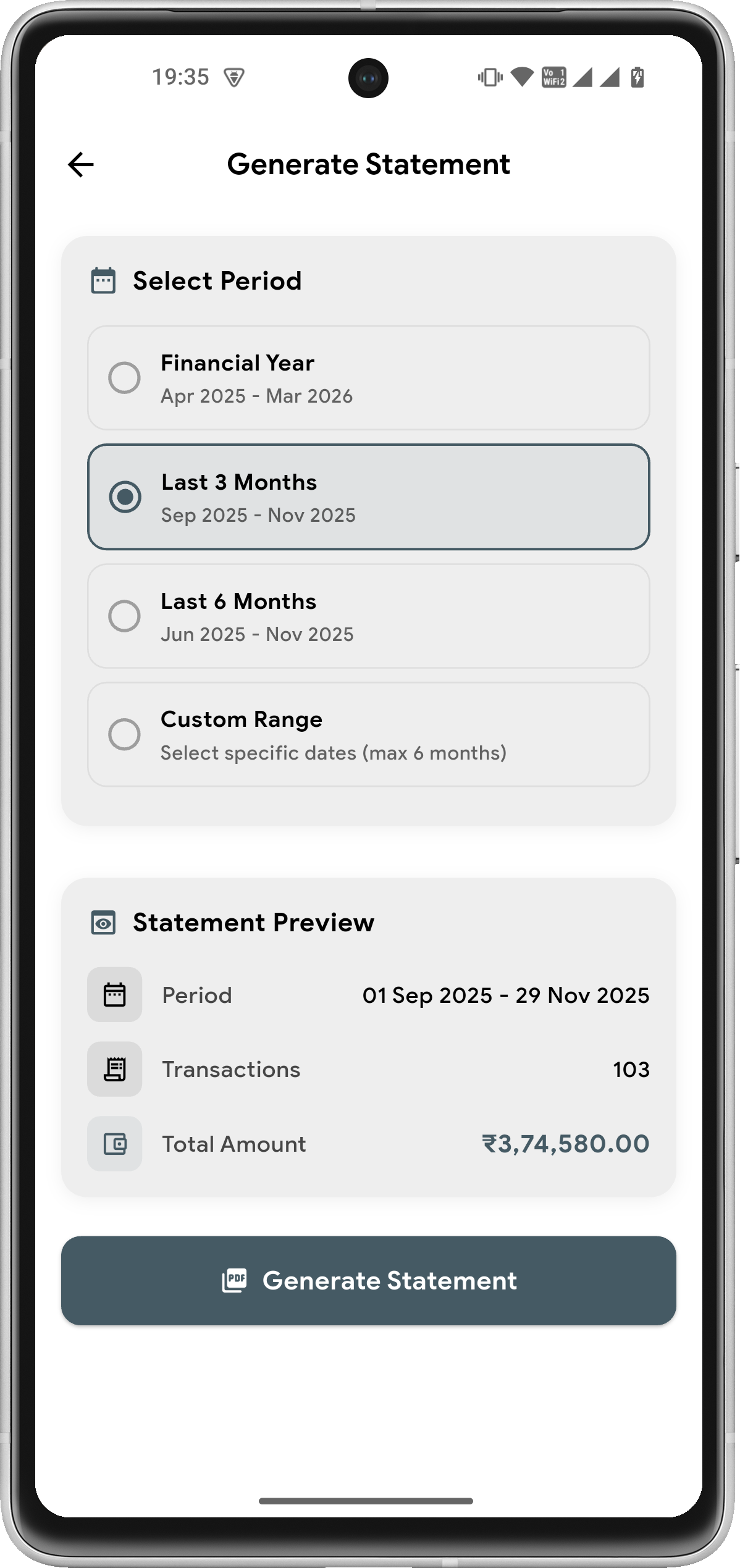
Generate detailed PDF statements with income and expenses. Choose FY, last 3/6 months, or custom date range.

Biometric Lock

Secure the app with fingerprint or face ID. Keep your financial data protected from unauthorized access.

Smart Search

Find transactions instantly with real-time search. Filter by notes, place, category, and date ranges.

Receipt Management

Attach images to transactions. Dedicated receipts screen to view all attachments with cloud sync support.

Dark Mode & Themes

Beautiful dark and light themes with persistent customization settings. Easy on the eyes, day or night.

NEW

Multi-Account Tracking

Manage Cash, Bank, Credit Card, Savings and more. Every transaction is account-linked for a clear picture of your money flow.

NEW

Home Screen Widget

16-week activity heatmap widget for Android. Income, expense, and streak at a glance — right from your home screen.

NEW

Smart Notifications & Digest

Streak alerts, weekly spending summaries, and monthly digests. Stay aware of your finances without opening the app.

COMING SOON

What's Next

We're constantly working on new features to make your financial management even better

Advanced Budget Analytics

Deep insights into your spending patterns with predictive analytics and smart recommendations.

Split Transactions

Divide expenses across multiple categories for shared bills and mixed purchases.

Advanced Account Analytics

Deep per-account insights — track spending trends, balance history, and net worth across all your accounts over time.

Email Report Exports

Schedule automated email reports with PDF attachments for easy record-keeping and sharing.

Tags & Labels

Organize transactions with custom tags for better categorization and powerful filtering.

Have a feature request?

FAQ

Frequently Asked Questions About Expense Manager

Everything you need to know about this free offline expense tracker & budget planner app

Is Expense Manager free to use?

Yes! Expense Manager is free to download and use. Core features like Privacy Mode, Smart Reminders, Multi-Currency Support, Budget Tracking, Savings Goals, and Google Drive Backup are available to all users. Premium features like Multiple Profiles and Payment Mode Analytics are available with a premium upgrade.

How do Multiple Profiles work?

Multiple Profiles is a premium feature that lets you separate your finances into dedicated spaces — for example, Personal, Business, and Family. Each profile has its own transactions, budgets, savings goals, categories, and reports. Switch between profiles instantly from Settings. All data stays on your device.

What is Payment Mode Analytics?

Payment Mode Analytics is a premium feature that shows how you spend across UPI, Cash, Credit Card, Debit Card, Net Banking, and Wallet. View donut charts for mode distribution, 6-month trends, and smart insights like "UPI is your top mode (45% of spend)". Available in monthly, yearly, and all-time views in the Analysis Dashboard.

How does Privacy Mode protect my financial data?

Privacy Mode hides all monetary amounts and receipt images throughout the app with a single toggle. Perfect for checking your finances in public places like cafes, trains, or offices without revealing sensitive information. You can enable it from Settings > Security > Privacy Mode.

Is my data stored on your servers?

No! All your financial data is stored locally on your device only. We never upload your transaction data to any external servers. Google Drive access is only used when you choose to create backups — either manually or via scheduled auto-backup. You remain in full control with no tracking and no data selling.

Can I track both income and expenses?

Absolutely! Expense Manager lets you track both income and expenses in one place. See your true net balance with dedicated categories for salary, freelance income, investments, as well as bills, shopping, food, and more. The Analysis Dashboard shows comprehensive insights with category breakdowns. Premium users can also track across multiple profiles and view payment mode analytics.

How does Budget Tracking help me?

Budget Tracking lets you set monthly or yearly spending limits by category or overall. Get smart 4-tier alerts (Healthy, Warning, Critical, Over Budget) as you approach your limits. The app helps you stay within budget with visual progress indicators and detailed spending breakdowns by category.

What devices are supported?

Expense Manager is available for Android devices running Android 5.0 (Lollipop) or higher. The app is optimized for phones and tablets with support for both portrait and landscape orientations. Download now from Google Play Store!

Is Expense Manager completely free to download?

Yes. Expense Manager is free to download and use. Core features — expense tracking, budget planning, savings goals, privacy mode, multi-currency support, and Google Drive backup — are all available at no cost. A one-time premium upgrade unlocks advanced features like multiple profiles and payment mode analytics.

Can I track expenses without an internet connection?

Absolutely. Expense Manager is a fully offline expense tracker — all your financial data lives on your device, never a server. You can add transactions, view reports, manage budgets, and track savings goals with no internet. Google Drive backup is optional and only runs when you trigger it. No login required, no forced cloud sync, no tracking.

How do I track my daily expenses on Android?

Download Expense Manager from Google Play — it's free. Tap the + button to log any expense or income in seconds. Choose a category (Food, Transport, Shopping, etc.), link it to an account (Cash, Bank, Card), and optionally attach a receipt photo. Your dashboard instantly updates your balance, budget status, and monthly summary. Set up recurring transactions for fixed bills so they log automatically.

How does Multi-Account Tracking work?

Multi-Account Tracking lets you create and manage multiple accounts — Cash, Bank, Credit Card, Savings, and more — all in one app. Every transaction is linked to a specific account so you always know exactly where your money is coming from and going to. You can view per-account balance summaries and filter transactions by account. A default Cash account is created automatically when you set up your profile.

What is the Home Screen Widget?

The Home Screen Widget is a 4×3 Android widget that displays a GitHub-style 16-week activity heatmap of your spending habits directly on your home screen. It shows this month's income and expense amounts, your active days count, and current streak — without opening the app. The widget syncs automatically every time you add a transaction or launch the app. Tap anywhere on it to open Expense Manager instantly.

Still have questions?

FROM THE BLOG

Tips & Guides for Smarter Expense Tracking

Learn how to manage your money better with our practical guides on budgeting, expense tracking, and financial privacy.

Download the Best Free Expense Tracker — Start Today

Join thousands of Android users who use Expense Manager to track daily spending, stick to budgets, and hit their savings goals — all offline, all private.

Download Free on Google Play